
Developer Guide — API Version 1
Purpose: The Vehicle Database API provides programmatic access to vehicle identification and specification data. The API is designed around a progressive lookup workflow so client applications can discover valid vehicle combinations instead of guessing Make, Model, and Year values.
Table of Contents
- 1. Overview
- 2. Base URLs
- 3. Authentication
- 4. Recommended Integration Workflow
- 5. Get Available Years
- 6. Get Makes for a Year
- 7. Get Models for Year and Make
- 8. Search Vehicle Specifications
- 9. Response Format
- 10. Input Rules
- 11. Empty Results
- 12. Error Responses
- 13. Rate Limiting
- 14. cURL Examples
- 15. PHP Example
- 16. Python Example
- 17. JavaScript / Node.js Example
- 18. Postman
- 19. Integration Best Practices
- 20. Future API Features
- 21. API Access and Support
1. Overview
The API provides four V1 endpoints:
| Endpoint | Purpose |
|---|---|
GET /years | Returns all available vehicle years. |
GET /makes?year= | Returns all Makes available for a selected Year. |
GET /models?year=&make= | Returns all Models available for a selected Year and Make. |
GET /search?year=&make=&model= | Returns matching vehicle specifications. |
2. Base URLs
Production
https://mage-extensions-themes.com/rest/V1/vehicleapiDemo
https://demo.mage-extensions-themes.com/rest/V1/vehicleapiDemo API: The Demo environment is intended for integration testing. A Demo API key is provided separately and is not published in this documentation.
3. Authentication
All API requests require a Vehicle Database API key.
Send the key using the HTTP Authorization header:
Authorization: Bearer vdb_live_xxxxxxxxxxxxxxxxxxxxxxxxxcURL Example
curl -i \
  "https://mage-extensions-themes.com/rest/V1/vehicleapi/years" \
  -H "Authorization: Bearer YOUR_API_KEY"
Keep API keys private. Do not commit keys to source control, publish them in documentation, place them in URLs, or expose production keys in browser-side JavaScript.
4. Recommended Integration Workflow
The recommended integration pattern is:
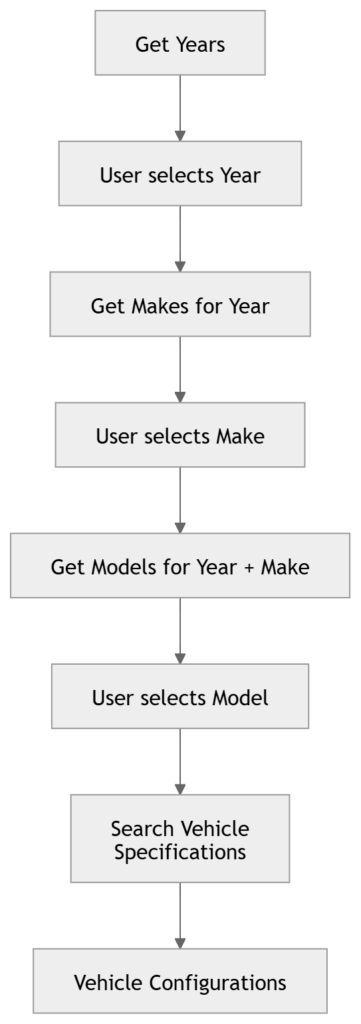
Best practice: Use the Years → Makes → Models → Search workflow rather than maintaining your own vehicle Make/Model list or guessing vehicle combinations.
5. Get Available Years
GET/years
Returns all vehicle years currently available in the Vehicle Database.
Request
curl -i \
  "https://mage-extensions-themes.com/rest/V1/vehicleapi/years" \
  -H "Authorization: Bearer YOUR_API_KEY"
Response
{
    "success": true,
    "count": 132,
    "data": [
        "2027",
        "2026",
        "2025",
        "2024",
        "2023"
    ]
}
6. Get Makes for a Year
GET/makes?year={year}
Returns all Makes available for the selected Year.
| Parameter | Required | Description |
|---|---|---|
year | Yes | Four-digit vehicle year. |
Request
curl -i \
  "https://mage-extensions-themes.com/rest/V1/vehicleapi/makes?year=2027" \
  -H "Authorization: Bearer YOUR_API_KEY"
Response
{
    "success": true,
    "year": "2027",
    "count": 63,
    "data": [
        "Acura",
        "Audi",
        "BMW",
        "Ford",
        "Honda",
        "Toyota",
        "Volkswagen",
        "Volvo"
    ]
}
7. Get Models for Year and Make
GET/models?year={year}&make={make}
Returns all Models available for the selected Year and Make.
| Parameter | Required | Description |
|---|---|---|
year | Yes | Four-digit vehicle year. |
make | Yes | Vehicle Make. Input is case-insensitive. |
Request
curl -i \
  "https://mage-extensions-themes.com/rest/V1/vehicleapi/models?year=2025&make=Toyota" \
  -H "Authorization: Bearer YOUR_API_KEY"
Response
{
    "success": true,
    "year": "2025",
    "make": "Toyota",
    "count": 26,
    "data": [
        "4Runner",
        "Avanza",
        "bZ4X",
        "Camry",
        "Corolla",
        "Corolla Cross",
        "Crown",
        "Crown Signia",
        "GR Corolla",
        "GR Supra",
        "GR86",
        "Grand Highlander",
        "Hiace",
        "Highlander",
        "Hilux",
        "Land Cruiser",
        "Mirai",
        "Prius",
        "Raize",
        "RAV4",
        "Sequoia",
        "Sienna",
        "Supra",
        "Tacoma",
        "Tundra",
        "Yaris"
    ]
}
Case-insensitive input
The Make input is case-insensitive. For example, Toyota, toyota, and TOYOTA identify the same Make.
The API returns the canonical Make value maintained in the Vehicle Database.
Request:
?year=1985&make=bmw

Response:
"year": "1985",
"make": "BMW"
8. Search Vehicle Specifications
GET/search?year={year}&make={make}&model={model}
Returns vehicle specifications matching the supplied Year, Make, and Model.
| Parameter | Required | Description |
|---|---|---|
year | Yes | Four-digit vehicle year. |
make | Yes | Vehicle Make. |
model | Yes | Vehicle Model. |
The Search endpoint returns a maximum of 50 matching records per request.
Request
curl -i \
  "https://mage-extensions-themes.com/rest/V1/vehicleapi/search?make=Honda&model=Civic&year=2025" \
  -H "Authorization: Bearer YOUR_API_KEY"
Response
{
    "success": true,
    "count": 11,
    "has_more": false,
    "data": [
        {
            "ymm_id": "6072792945",
            "make": "Honda",
            "model": "Civic",
            "year": "2025",
            "engine": "2.0L 1993CC 122Cu. In. l4 GAS DOHC Naturally Aspirated",
            "submodel": "Sport",
            "trim": "Sport Hatchback 4-Door",
            "body": "Hatchback",
            "cylinder_type": "DOHC",
            "drive_type": "FWD",
            "engine_block_type": "L",
            "engine_cc": "1993",
            "engine_cid": "122",
            "engine_cylinders": "4",
            "engine_liter_display": "2.0L",
            "transmission": "Automatic",
            "fuel_type": "GAS",
            "vehicle_display_name": "Honda Civic 2025 Sport",
            "number_of_doors": "4",
            "aspiration": "Naturally Aspirated",
            "parts_model": "Civic",
            "market_region": "1|2"
        }
    ]
}
All matching vehicle configurations are returned up to the endpoint limit. has_more indicates whether additional matching records exist beyond the returned set.
9. Response Format
Lookup endpoints
Years, Makes, and Models return a consistent structure:
{
    "success": true,
    "count": 0,
    "data": []
}
Make/Model lookup responses also include the selected Year and/or canonical Make.
Search endpoint
Search returns:
{
    "success": true,
    "count": 0,
    "has_more": false,
    "data": []
}
10. Input Rules
Wildcards are not supported
Wildcard characters are intentionally rejected. Examples:
make=Toy%
make=Toy_
model=Cam%
Response:
{
    "message": "Wildcard characters are not allowed."
}
Exact lookup values
The API supports case-insensitive input, but does not perform partial or wildcard matching. Use the progressive lookup endpoints to discover valid values.
11. Empty Results
A valid request that has no matching vehicle returns a successful response with an empty data array.
{
    "success": true,
    "count": 0,
    "has_more": false,
    "data": []
}
This is different from an invalid request or authentication failure.
12. Error Responses
| Condition | HTTP Status | Example |
|---|---|---|
| Missing API key | 401 | API key is required. |
| Invalid API key | 401 | Invalid API key. |
| Missing required parameter | 400 | Magento Web API required-field response |
| Invalid Year | 400 | Year must be a four-digit year. |
| Wildcard characters | 400 | Wildcard characters are not allowed. |
| Rate limit exceeded | 429 | Retry after the rate-limit window. |
Example: Missing Make
{
    "message": "\"%fieldName\" is required. Enter and try again.",
    "parameters": {
        "fieldName": "make"
    }
}
Example: Invalid Year
{
    "message": "Year must be a four-digit year."
}
13. Rate Limiting
Each API key has an independently configured requests-per-minute limit.
The standard production limit is currently 100 requests per minute, although limits may be configured differently for individual clients.
Rate-limit headers
X-RateLimit-Limit: 100
X-RateLimit-Remaining: 99
When the limit is exceeded, the API returns:
HTTP 429 Too Many RequestsApplications should wait for the current rate-limit window to reset before retrying.
14. cURL Examples
Get Years
curl -i \
  "https://mage-extensions-themes.com/rest/V1/vehicleapi/years" \
  -H "Authorization: Bearer YOUR_API_KEY"
Get Makes
curl -i \
  "https://mage-extensions-themes.com/rest/V1/vehicleapi/makes?year=2025" \
  -H "Authorization: Bearer YOUR_API_KEY"
Get Models
curl -i \
  "https://mage-extensions-themes.com/rest/V1/vehicleapi/models?year=2025&make=Toyota" \
  -H "Authorization: Bearer YOUR_API_KEY"
Search
curl -i \
  "https://mage-extensions-themes.com/rest/V1/vehicleapi/search?year=2025&make=Honda&model=Civic" \
  -H "Authorization: Bearer YOUR_API_KEY"
15. PHP Example
<?php

$apiKey = 'YOUR_API_KEY';

$url = 'https://mage-extensions-themes.com/rest/V1/vehicleapi/search'
    . '?year=2025'
    . '&make=Honda'
    . '&model=Civic';

$ch = curl_init($url);

curl_setopt_array($ch, [
    CURLOPT_RETURNTRANSFER => true,
    CURLOPT_HTTPHEADER => [
        'Authorization: Bearer ' . $apiKey,
        'Accept: application/json',
    ],
]);

$response = curl_exec($ch);

if ($response === false) {
    throw new RuntimeException(curl_error($ch));
}

$httpCode = curl_getinfo($ch, CURLINFO_HTTP_CODE);

curl_close($ch);

$data = json_decode($response, true);

if ($httpCode !== 200) {
    throw new RuntimeException(
        $data['message'] ?? 'API request failed.'
    );
}

foreach ($data['data'] as $vehicle) {
    echo $vehicle['vehicle_display_name'] . PHP_EOL;
}
16. Python Example
import requests

api_key = "YOUR_API_KEY"

url = "https://mage-extensions-themes.com/rest/V1/vehicleapi/search"

params = {
    "year": "2025",
    "make": "Honda",
    "model": "Civic"
}

headers = {
    "Authorization": f"Bearer {api_key}",
    "Accept": "application/json"
}

response = requests.get(
    url,
    params=params,
    headers=headers,
    timeout=30
)

response.raise_for_status()

data = response.json()

for vehicle in data["data"]:
    print(vehicle["vehicle_display_name"])
17. JavaScript / Node.js Example
const response = await fetch(
    "https://mage-extensions-themes.com/rest/V1/vehicleapi/search?year=2025&make=Honda&model=Civic",
    {
        headers: {
            "Authorization": "Bearer YOUR_API_KEY",
            "Accept": "application/json"
        }
    }
);

const data = await response.json();

console.log(data);
Browser applications: Do not expose a production API key in client-side JavaScript delivered to end users. If browser-side access is required, use your own server-side application as a secure proxy.
18. Postman
A Postman collection can be provided for clients who prefer an interactive testing environment.
The collection should use variables rather than embedding a real API key:
VDB_BASE_URL
VDB_API_KEY
For Demo testing:
VDB_BASE_URL =
https://demo.mage-extensions-themes.com/rest/V1/vehicleapi
For Production:
VDB_BASE_URL =
https://mage-extensions-themes.com/rest/V1/vehicleapi
The API key should be entered by the client into the Postman environment or collection variable.
19. Integration Best Practices
- Use the progressive Year → Make → Model → Search workflow.
- Do not maintain a separate hard-coded vehicle list unless required by your application.
- Use the canonical Make and Model values returned by the API.
- Store API keys securely on the server side.
- Monitor
X-RateLimit-Remainingand avoid unnecessary requests. - Handle HTTP 401, 400, and 429 responses gracefully.
- Cache lookup results such as Years, Makes, and Models in your application where appropriate.
- Do not use wildcard or partial searches.
20. Future API Features
The following capabilities are planned for future releases and are not currently part of V1.
Engine Lookup
GET /engines?year={year}&make={make}&model={model}This endpoint will allow clients to retrieve available engines for a selected Year, Make, and Model.
Bulk Data Feed
A future data-feed API will allow authorized clients to download vehicle data in bulk, potentially as a compressed ZIP package.
Important: Future endpoints are shown for roadmap purposes only and should not be used until they are officially released.
21. API Access and Support
Production API access requires an issued Vehicle Database API key.
Demo API access is available for integration testing.
Contact Global eCom to request a Demo API key.
Vehicle Database API
Demo: https://demo.mage-extensions-themes.com/rest/V1/vehicleapi